

Moving content from a subdomain to a main domain can simplify a website, consolidate SEO signals, and make content easier to manage. It can also cause lost rankings, broken links, and reporting gaps when handled poorly.
A successful subdomain migration is not simply a matter of copying pages from blog.example.com to example.com/blog/. Every existing URL, redirect, canonical tag, internal link, structured data reference, and tracking configuration must be considered. Search engines also need consistent signals that show where the content has moved.
This guide explains how businesses can plan, test, launch, and monitor a subdomain-to-main-domain site migration in November 2026. For organizations that need technical support, AGR Technology provides SEO, website development, and migration services designed to protect existing visibility while creating a cleaner platform for long-term growth.
Key Takeaways
- Migrating a subdomain to the main domain simplifies site management and consolidates SEO signals for stronger organic growth.
- A thorough migration plan must include detailed URL mapping, clear 301 redirects, updated internal links, and consistent SEO signals to protect rankings.
- Performing comprehensive audits and setting performance benchmarks before migration helps monitor impact and distinguish issues from normal fluctuations.
- Testing the migration in a staging environment ensures all pages, redirects, and tracking work correctly before launch, preventing costly errors.
- Careful post-launch monitoring of traffic, rankings, and errors is essential to troubleshoot issues and maintain search visibility during the transition.
- Preserving existing SEO equity through direct redirects and consistent messaging lays a strong foundation for long-term improvements after consolidation.
Why Consolidate a Subdomain Into the Main Domain?
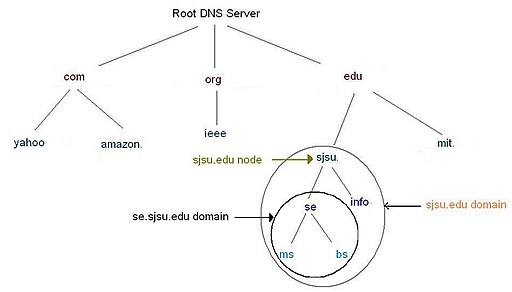
A subdomain operates as a distinct website section, such as support.example.com or shop.example.com. Search engines understand the relationship between a subdomain and its root domain, but they may still evaluate each host separately in areas such as crawling, internal linking, and site quality.
Moving the content into a subdirectory, for example, example.com/support/, can create a more unified website structure. The practical benefits may include:
- Simpler site management: Teams can manage navigation, templates, analytics, and technical SEO through a more consistent platform.
- Stronger internal linking: Relevant pages can connect naturally without sending users between separate hosts.
- A clearer customer journey: Visitors stay within one branded website as they move from informational content to products, services, or enquiries.
- Consolidated reporting: Analytics and attribution are often easier to configure and interpret.
- More consistent SEO signals: Content, backlinks, and topical relationships are presented as part of one organized website.
Consolidation is not automatically the right choice. A subdomain may be appropriate when it runs on separate infrastructure, serves a different country or audience, or contains a standalone application. The decision should come from business and technical requirements, not the assumption that a subdirectory always ranks better.
Before proceeding, businesses should confirm that the main domain can support the content, traffic, functionality, and security requirements currently handled by the subdomain.
Plan the Migration Around SEO, Content, and Business Goals
A migration plan should define what success looks like before development begins. That might mean preserving non-brand organic traffic, reducing platform costs, improving lead generation, or bringing a blog and service website into one content system.
The project should involve SEO, development, content, analytics, design, and business stakeholders. Each team sees a different risk. Developers may focus on routing and infrastructure, while an SEO specialist notices that a high-value resource has been excluded from the redirect plan. Bringing those views together early prevents expensive launch-day corrections.
The plan should document:
- The content and functionality being moved
- Pages that will be retained, merged, rewritten, or retired
- The target URL structure
- Platform and server requirements
- Redirect ownership and implementation method
- Analytics and conversion-tracking changes
- Testing responsibilities and approval criteria
- The launch date, rollback process, and monitoring period
Avoid scheduling the migration during a major sales event or the busiest trading period. Some ranking fluctuation can occur while search engines crawl redirects and process the new URLs. A lower-risk launch window gives the team time to identify and fix problems without disrupting critical campaigns.
Audit the Subdomain and Establish Performance Benchmarks
The audit creates the migration’s source of truth. A crawler should collect all accessible subdomain URLs, including HTML pages, PDFs, images, canonical targets, redirects, and error pages. That crawl should be compared with XML sitemaps, analytics landing pages, server logs, backlink data, and indexed URLs reported in Google Search Console and Bing Webmaster Tools.
For each URL, record relevant information such as:
- HTTP status code and indexability
- Page title, meta description, and H1
- Canonical URL and robots directives
- Organic sessions, conversions, and revenue or leads
- Search impressions, clicks, rankings, and queries
- Internal and external links
- Structured data and hreflang annotations
- Content owner and migration decision
Performance benchmarks should cover at least several representative weeks and account for seasonality. They allow the business to distinguish a migration issue from an ordinary change in demand. Priority pages should also be identified early. A page producing qualified enquiries or holding valuable backlinks deserves closer testing than an obsolete announcement with no traffic.
Build a Complete Old-to-New URL Mapping
The redirect map connects every old subdomain URL to its most relevant destination on the main domain. It should be created at the individual URL level rather than relying on a broad rule that sends everything to the homepage.
A strong mapping file typically includes the old URL, proposed destination, page status, redirect status, content action, priority, and testing result. Each destination should match the original page’s intent as closely as possible.
For example:
blog.example.com/migration-guide/could move toexample.com/resources/migration-guide/.- Two overlapping articles could be combined into one stronger resource, with both old URLs redirected to it.
- A discontinued service page could redirect to the nearest current service only when that page genuinely answers the same need.
- A page with no useful replacement may return a 404 or 410 rather than misleading visitors with an irrelevant redirect.
Preserving the existing path structure can reduce complexity, but it should not lock the business into weak information architecture. A migration is a sensible time to improve inconsistent folders, duplicate URLs, and unclear naming, as long as every change is mapped.
The final list should also include non-HTML assets that attract traffic or backlinks. Forgotten PDFs, campaign pages, downloadable templates, and image URLs can carry authority and customer value. Query parameters and case variations should be assessed so they do not create duplicate destinations or redirect loops.
Implement the Migration’s Technical SEO Requirements
Technical implementation needs to send the same message to users, crawlers, and analytics systems: the content has moved permanently, and the new URLs are now the preferred versions.
The new pages should be complete and functional before redirects are activated. They must return the correct status codes, render important content, work on mobile devices, and preserve essential metadata. If the migration also includes a redesign or major copy rewrite, diagnosis becomes harder because several variables change at once. Where possible, businesses should separate structural migration work from large creative changes.
Configure Server-Side 301 Redirects Without Chains or Loops
Permanent server-side 301 redirects are generally the appropriate choice for a lasting URL move. They should send each old URL directly to its final new destination in one step.
A redirect chain such as old URL → temporary URL → final URL increases crawl work and slows users. A loop makes the destination inaccessible. Redirect rules should hence be tested against the full mapping, including trailing slashes, uppercase paths, HTTP versions, and URL parameters.
Wildcard rules can be efficient when paths correspond exactly, but they require care. One loose expression can redirect thousands of URLs incorrectly. High-value and exceptional URLs often need explicit rules.
Redirects should remain active for the long term. Removing them after a few weeks can break old bookmarks and external links, while search engines may still encounter the previous URLs. The old subdomain’s domain name, DNS, hosting, and TLS certificate must also remain operational so requests can reach the redirect server securely.
Update Internal Links, Canonicals, Sitemaps, and Other Signals
Redirects are a safety net, not a substitute for updating the website. All internal links should point directly to the new URLs. This includes navigation, breadcrumbs, body copy, footer links, image references, pagination, hreflang tags, structured data, and links embedded in templates.
Each migrated page should usually have a self-referencing canonical tag on the main domain. Canonicals that still reference the subdomain create conflicting signals. XML sitemaps should contain only canonical, indexable URLs returning a successful 200 response.
The implementation should also update:
- Open Graph and social-sharing URLs
- Robots.txt references to sitemaps
- Analytics properties, filters, and cross-domain settings
- Conversion tags and consent configurations
- Search Console and Bing Webmaster Tools profiles
- Paid campaign landing-page URLs
- Email templates and automated customer messages
- Content delivery network and caching rules
The new directory must not be blocked by robots.txt or left with staging noindex tags. These small oversights are among the most damaging migration errors because they can prevent search engines from accessing or indexing the replacement content.
Test the Migration in Staging Before Launch
Staging tests should verify content, functionality, and technical signals without allowing the test environment to enter search results. Access controls are generally safer than relying only on robots.txt, which does not guarantee that staging URLs will remain unindexed.
The team should crawl the staging site and compare its results with the approved URL map. Testing should confirm that:
- Every planned page exists at the correct destination
- New pages return a 200 status code
- Canonicals use the final production URLs
- Titles, headings, copy, media, and structured data are present
- Forms, search tools, filters, and account features work
- Mobile layouts and important templates display correctly
- Internal links avoid staging and old subdomain URLs
- Analytics and conversion events fire as intended
Redirect rules can be tested in a protected production-like environment or against a temporary host configuration. Automated checks are useful, but important customer journeys need manual review. A crawler will report that a contact page loads: it will not always reveal that the form confirmation fails or that a phone link is wrong.
The business should define go/no-go criteria before launch. Critical errors, such as widespread 404s, incorrect redirects, blocked resources, or missing tracking, should stop the release. A documented rollback procedure should identify who can reverse DNS, application, and server changes if a serious fault appears.
Launch, Monitor, and Troubleshoot Traffic or Ranking Changes
Launch day should follow a checklist rather than improvisation. After the new pages are published and redirects are enabled, the team should clear relevant caches, run a fresh crawl, test priority URLs, and submit the updated XML sitemap through search-engine webmaster tools.
Monitoring should begin immediately and continue for several weeks or longer on a large website. Key signals include:
- Organic sessions and conversions by landing page
- Search impressions, clicks, and average positions
- Googlebot and Bingbot activity in server logs
- 404, 5xx, redirect-chain, and redirect-loop errors
- Index coverage and canonical selection
- Page speed and Core Web Vitals
- Form completions, calls, sales, and other business outcomes
Temporary volatility does not always indicate failure. Search engines need time to recrawl old URLs, follow the redirects, and index the replacements. The pattern matters. A gradual transition between equivalent URL sets is different from an immediate sitewide collapse caused by noindex tags or failed redirect rules.
When traffic falls, the team should compare affected old pages with their mapped destinations. Common causes include missing content, redirects to irrelevant pages, changed search intent, internal links still pointing to the subdomain, canonical errors, blocked JavaScript or CSS, and tracking misconfiguration.
Valuable external links should be reviewed as well. Although 301 redirects preserve access and pass signals, asking the owners of important, relevant backlinks to update their links creates a cleaner path. Businesses should also annotate the migration date in reporting platforms so future analysis has the right context.
AGR Technology can manage the process across technical SEO, development, analytics, and post-launch monitoring. Businesses planning a complex migration can contact AGR Technology for a migration assessment and a practical implementation plan based on their current platform, content inventory, and organic search priorities.
Conclusion: Turn Domain Consolidation Into Long-Term Organic Growth
A subdomain-to-main-domain migration can create a clearer website, simpler management, and a stronger customer journey. But the result depends on disciplined execution: complete URL mapping, direct 301 redirects, consistent SEO signals, thorough staging tests, and close post-launch monitoring.
The safest migration preserves what already works before trying to improve it. Once the new structure is stable, the business can strengthen internal linking, refresh priority content, and build topic coverage around commercial goals.
AGR Technology helps organizations plan and carry out SEO-safe website migrations without treating search visibility as an afterthought. To reduce migration risk and give the consolidated site a sound foundation, businesses can request a consultation with AGR Technology before development or redirect work begins.
Frequently Asked Questions About Subdomain to Main Domain Site Migrations
Why should I consider migrating a subdomain to the main domain?
Moving a subdomain into the main domain simplifies site management, strengthens internal linking, consolidates SEO signals, and creates a clearer customer journey, which can support long-term organic growth.
What are the key steps to plan a subdomain to main domain migration?
Plan the migration by defining goals, documenting content moves, setting URL structures, identifying redirect ownership, configuring analytics changes, scheduling testing, and choosing a launch date outside major sales periods.
How can I ensure SEO rankings are preserved during the migration?
Preserve SEO rankings by creating a complete old-to-new URL mapping, implementing direct 301 redirects without chains, updating internal links and canonical tags, testing thoroughly in staging, and monitoring traffic post-launch.
What technical considerations are critical when migrating from a subdomain?
Ensure new pages are functional, return correct status codes, use updated canonical tags, configure server-side 301 redirects properly, and update all SEO signals including sitemaps, robots.txt, analytics, and tracking configurations.
How long should 301 redirects from the old subdomain remain active?
Redirects should remain active long term to support search engines and users, as removing them too soon can break backlinks, bookmarks, and indexing continuity.
Can I migrate a subdomain to the main domain if the subdomain serves a different audience or infrastructure?
Not always; subdomains are suitable when serving different countries, audiences, or standalone applications. The decision should be based on business and technical needs, not the assumption that a subdirectory always ranks better.
Related content:
SEO For Website Redesign And Migration
Adobe Experience Manager to WordPress Migration Service
Cloud Migration & Management Services
Magento To WordPress Migration
Migration Support For Web Hosts

Alessio Rigoli is the founder of AGR Technology and got his start working in the IT space originally in Education and then in the private sector helping businesses in various industries. Alessio maintains the blog and is interested in a number of different topics emerging and current such as Digital marketing, Software development, Cryptocurrency/Blockchain, Cyber security, Linux and more.
Alessio Rigoli, AGR Technology